.svg)
After a Merger or Acquisition: Keeping the Acquired Company's NetSuite History
A merger or an acquisition usually leaves the combined business with one ERP too many. The acquirer standardises on its own platform, or the merged company keeps one of the two, and the NetSuite account that loses is given a date. The account can be switched off; its history cannot: the transactions behind the opening balances, the years an auditor will ask about, the old invoices a customer will still query. For the acquirer's finance and integration teams, the questions are what the archive of the acquired account has to hold, how it is verified before the account is switched off, and who sees it afterwards. The seller's side, one entity scoped out of a group account, is on the divestiture and entity separation page.
Trusted by
.png)






.png)





.png)



.png)














Keep the acquired company's history after its account is switched off
AcroXtract extracts the acquired account's records with their relationships and the File Cabinet, and the acquirer's finance team verifies the result before the account is switched off.
The archive is hosted read-only on DBVault with access scoped to the people who need it, or delivered as a database the combined business keeps.
What happens next: a reply by email to arrange the walkthrough. No specification, sizing or commitment is needed to ask.
See a completed NetSuite extraction
A walkthrough of a completed extraction on a demonstration archive: the database, the File Cabinet download and the financial reports DBVault runs from it. No account sizing needed first.
One ERP too many, and the losing one has a date
Once the deal closes, the integration plan decides which system carries the combined business forward, and it is rarely the acquired company's NetSuite account. From then on the account exists for its history. Three ways exist to keep that history; only one keeps it usable without keeping the account.


Keep the acquired account open to read it
The subscription renews every year for a company that no longer trades on it, and access stays tied to NetSuite seats that someone in the acquirer's organisation has to administer. The result is a second system to secure, a second login for the auditor, and a licence carried indefinitely for data nobody enters. What that buys, and keeps costing, is set out on the caretaker licence cost page.
Load the history into the acquirer's ERP
The integration team's scope is deliberately narrow: opening balances, open items and the master data the combined business needs from day one. Years of closed transactions, with their lines, posting detail and attachments, are the wrong shape for a system with different rules. A migration that takes them has to clean, map and reconcile every one, and once loaded they are figures in the new system rather than evidence from the old.
Keep the account's history as a distinct archive
The whole account is extracted with its relationships intact, verified against the source, and hosted read-only where the acquirer's finance team, its auditors and anyone the agreement entitles can search and report from it without a NetSuite licence. This is what we do, with AcroXtract for the extraction and DBVault for the access.
What has to happen before the acquired account is switched off
The integration programme has a calendar, and the archive has to be in use before the date on it. The work divides cleanly when the responsibilities are written down early, in this order.

1 · Decide what the acquirer's system takes
Finance and the integration team agree which data the acquirer's ERP loads and which stays as history. Opening balances and open items go across as figures; the transactions behind them stay in the archive, where they remain evidence. That agreement is the scope of both projects.
2 · Size the account and arrange access
Database size, File Cabinet size, subsidiaries, accounting books and the number of people who will need the archive. A dedicated login for the extraction, used read-only, separate from whatever access the integration team holds.
3 · Full extraction while the acquired team finishes
Account mapping, indexing, database creation and record extraction run against the live account by AcroXtract while the acquired company's finance team closes its final periods. Nothing here waits for the integration.
4 · Cut-off and delta
When the finance team has posted its last entries, a delta extraction picks up every record that changed since the first pass, and the combined set is verified again. The account is switched off on the integration plan's date rather than a date the extraction dictates.
5 · Verification and the acquirer's acceptance
Extracted records are compared against the source at the database level. Then the acquirer's finance team works the archive against the questions it will be asked once the account is gone, with issues tracked as tickets until sign-off.
6 · Delivery
Access on DBVault for the named people, and the data itself as a MySQL database snapshot and a zip of the database and the extracted File Cabinet, so the acquirer holds its own copy.
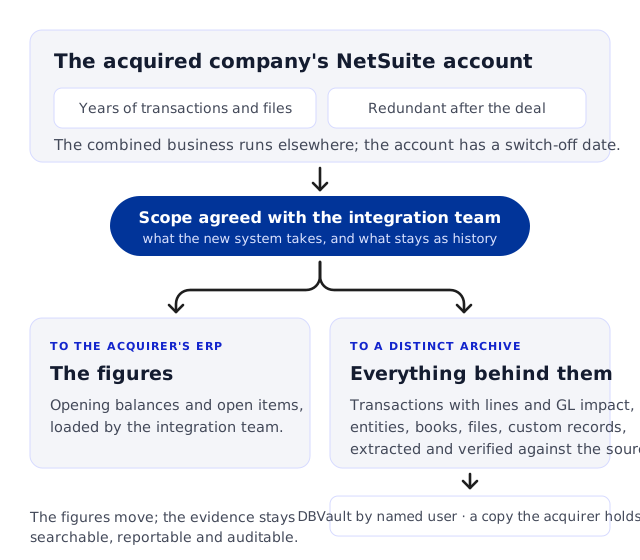
What the acquired company's archive has to hold
The GL impact of every transaction, so a trial balance and general ledger can be run for the periods before the acquisition.
Transactions with their lines, payments with their applications, journal entries with every line.
The customers, vendors, items and accounts those transactions resolve to.
Each accounting book where Multi-Book is in use, and every subsidiary the account held.
File Cabinet attachments linked to the records they support.
Custom records and custom fields, named as they were in the account.
If the acquirer is also on NetSuite
The same division applies when the combined business runs on the acquirer's NetSuite account. The acquired company's environment becomes a distinct archive with its own identity; it is not merged into the acquirer's account. Loading selected records into that account is a separate migration activity, scoped on its own and carried out by the team implementing it. We do not load archived data into NetSuite.
How the acquirer knows the archive is right
The acquirer relies on a dataset it did not create, from an account run by a team that may not be there after the integration. Verification runs in layers, and acceptance is done by the people who will live with the result.
Automated comparison against the source
Extracted records are compared against the acquired account at the database level, not by a spot count, as a fixed step of every AcroXtract engagement.
Reconciliation to the closing figures
Because the archive holds the GL impact of every transaction, a trial balance and general ledger can be run for the acquired company's final periods and set against the figures it reported for them, book by book where Multi-Book is in use. That is the check that ties the archive to the opening balances the acquirer brought across.
Relationships and attachments
Transactions still resolve to their customers, vendors, items and lines, and File Cabinet documents open from the records they support. A folder of exported files cannot pass this check; the difference shows the first time someone looks for the invoice behind a payment.
Acceptance by the acquirer's finance team
A formal validation period in which the receiving team works the archive against real questions, with ticket-based issue reporting until sign-off. The acquired company's finance staff, where still available, are worth having in that period. The checks a team can run itself are in How to verify a NetSuite export is complete.
Who sees the acquired company's history afterwards
The people who need the archive after an acquisition were never users of the acquired account: the acquirer's controller and tax team, the group's auditors, sometimes the seller under the terms of the agreement. On DBVault each is a named user with a restriction profile, and the platform logs who looked and who exported.

The acquirer's finance and tax teams
Search the archive by transaction number, document number, entity, e-mail or memo; open a transaction with its lines, GL impact and attachments; reproduce an invoice as a document when a customer or a tax authority asks. Financial reports run from the archived data for the periods before the acquisition.

Auditors of the pre-acquisition periods
A restriction profile limits an auditor to the archive, the record types, the File Cabinet folders and the subsidiaries their engagement covers, each as an allow list or a deny list. Direct browsing of the File Cabinet can be switched off, so documents open only from records they may already see.

The seller, or the acquired company's former staff
Where the agreement gives the other side access to the history, a profile scoped to that one archive gives it and nothing else: other archives in the tenant are not shown. Login events and download history are kept, so who saw what after closing has an answer. Restrictions apply to viewer roles.
When to decide, and what shapes the cost
The useful moment is when the integration plan sets the date the acquired account is switched off, or when its subscription term turns out to end sooner than that. If the term ends with the deal, the archive should be in use before that date. If you are already inside that window, say so; the extraction is then scheduled around it.
Acquirers who know before closing that the target runs NetSuite can put the archive into the integration plan from the start, so the extraction runs alongside the day-one work rather than after it. The sizing form on the AcroXtract page collects database size, File Cabinet size and user count, and a quote for the extraction and for DBVault hosting follows from those.
Hosting is an annual subscription with no licence to renew for the retired account and no per-report charge. The comparison with keeping the account open to read it is on the caretaker licence cost page.
Questions asked after a merger or acquisition
We have acquired a company that runs NetSuite and we are consolidating on our own ERP. What happens to its history?
.webp)
It is extracted in full, verified against the source and kept as a distinct archive, so the acquired company's records keep their own identity while the combined business runs on your platform. Your integration team loads what it needs for day one, opening balances and open items, and the transactions behind those figures stay in the archive for finance, tax and audit. Access is by named user on DBVault, and you also hold the data as a MySQL snapshot and a zip of the database and File Cabinet.
We are on NetSuite too. Can you merge the acquired company's account into ours?
No. The acquired environment is treated as a distinct archive with its own identity; it is not merged into your account. Loading selected records into your NetSuite account is a separate migration activity, scoped on its own and carried out by the team implementing it. We do not load archived data into NetSuite; we supply it in CSV or MySQL form and work alongside the team doing the load.
Can the archive produce a trial balance for the periods before the acquisition?
Yes. The archive holds the GL impact of every transaction, so financial reports run from the archived data: trial balance, balance sheet, income statement, general ledger, P&L by subsidiary, department, class or location, and audit reports such as the transaction journal, for the periods, subsidiaries and accounting books the acquired account held.
The acquired company's finance team is still posting. Do we have to wait until they stop?
No. The full extraction runs while the account is in use; when the team has posted its last entries, a delta extraction picks up what changed and the combined set is verified again. The cut-off follows the integration plan rather than the extraction. The mechanics are on the extracting while the account is live page.
The seller keeps a right to the history under the agreement. Can both sides use the archive?
Access is granted by your administrator to named users, and a restriction profile can limit a user to one archive, to particular record types, File Cabinet folders and subsidiaries, with direct file browsing switched off. The seller's people can be given the one archive the agreement covers and nothing else, and their logins and downloads are logged. Who is entitled to what is the agreement's decision, not ours.
Who decides which records we have to keep, and for how long?
You and your advisers. We do not decide purchase-accounting, legal-hold or retention rules, and we do not review, interpret or classify the contents of the records. We extract what is in scope, verify it against the source, and give authorised users the means to search, view and export it. The archive stays on DBVault for as long as your policy requires, under an annual subscription.
We have acquired several companies over the years, each on its own NetSuite account. One archive or several?
Several. Each account is extracted and verified on its own and becomes its own archive; a DBVault tenant can hold several, and restriction profiles are set per archive, so a person can be limited to one company's history or given all of them. The archives are not combined into one dataset.
Plan the archive for an acquired NetSuite account


.svg)


.png)
.png)