.svg)
Extracting NetSuite Data While the Account Is Still in Use
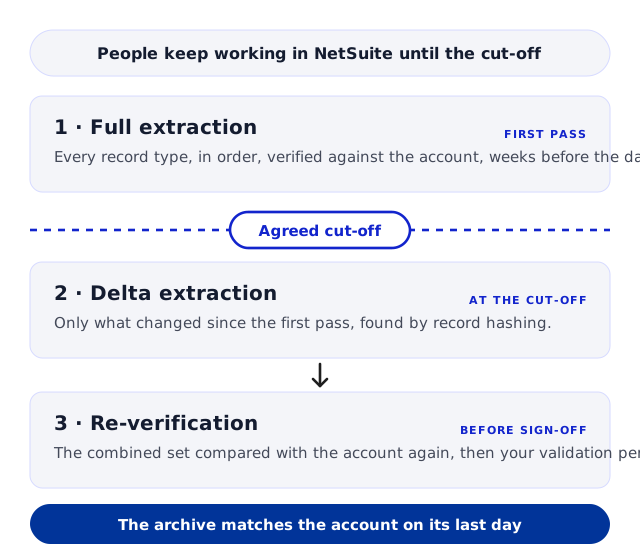
Most companies keep transacting in NetSuite until the day the new system goes live. That makes a full extraction taken weeks earlier incomplete by definition, and it is the reason a decommissioning plan has a step most people leave out. The first extraction, the agreed cut-off, the delta and the re-verification fit together so that the archive matches the account on its last day rather than on the day the project started.
Trusted by
.png)






.png)





.png)



.png)














Extract the account while the business keeps working
AcroXtract extracts every record type in the agreed scope read-only, through a dedicated login, while the business carries on, with the relationships intact. The first pass, the cut-off and the delta are planned together, and the archive is verified before access ends.
The archive is hosted read-only on DBVault, or delivered as a database. Either way the data is the organisation's to keep.
What happens next: a reply by email to arrange the walkthrough. No specification, sizing or commitment is needed to ask.
See a completed NetSuite extraction
A walkthrough of a completed extraction on a demonstration archive: the database, the File Cabinet download and the financial reports DBVault runs from it. No account sizing needed first.
A moving target, and three ways to deal with it
An extraction reads the account as it stands on the day it runs. If invoices, payments and journals are still being entered after that day, the archive and the account drift apart from the moment the first pass finishes. There are three ways companies handle it.


Freeze the account early
Stop data entry before the extraction starts, so a single full pass captures the final state. Clean, and rarely possible: the business usually needs NetSuite until the new system is ready, and integrations, scripts and late adjustments can still change a frozen account. Where an account really is frozen, a delta may be unnecessary.
Extract at the very end
Wait until the last day and take everything then. This puts the whole extraction, its verification and your own validation after the moment you can still check anything against the source, and it leaves no time for a second pass if something is found.
Extract early, agree a cut-off, take a delta
The full extraction runs while the account is live. You agree a final data-entry cut-off, a delta brings across what changed after the first pass, and the combined set is verified again. This is how AcroXtract runs a decommissioning where people are still working.
How the first pass, the cut-off and the delta fit together
The sequence is the standard six-step extraction with one more step at the end, and the order matters because the delta is defined by the first pass.

1 · Full extraction, while the business keeps working
Account mapping, indexing, database creation and record extraction run as usual. The result is a complete archive as of the day each dataset was captured. Data entered after a record or dataset was extracted is not in it.
2 · Verification and your validation period
The first pass is compared against the source at the database level and the financials are reconciled. Your team then works the archive against real questions and raises anything that looks wrong as a tracked ticket. Doing this on the first pass, while the account is open, means the second pass inherits a verified structure.
3 · Agree the final data-entry cut-off
A date and time after which nobody enters or changes anything in NetSuite: the last invoice, the last period close, the last adjustment. Integrations and scheduled scripts count as users here. The cut-off is what makes the delta finite.
4 · The delta
After the cut-off, a delta extraction identifies the records created or changed since the first pass and brings them across. It is a separate, one-time step, priced alongside the full extraction, and it is not the same thing as the scheduled deltas a continuous backup runs.
5 · Re-verification of the combined set
The archive is verified again with the delta applied: counts against the source, financials reconciled by subsidiary, period and book, relationships and attachments checked. Only now does the archive match the account on its last day.
6 · Access is disabled
Once the delta is verified and the validation issues are closed, you disable the extraction login. Coordinate the timing so access is not removed before the final pass has run.
What the cut-off has to cover
A date and time, agreed and communicated to every NetSuite user
Integrations and scheduled scripts that write to the account
The last period close and any post-close adjustments
Customisations that changed after the first pass
Who confirms that entry has stopped, and to whom
When the extraction login is disabled
When the migration runs long
Where NetSuite stays in use for months while the target system is built, one delta at the end can be too large a gap to leave. An interim delta near a migration milestone and a final delta after the true cut-off keep the archive close to the account throughout; each delta is a defined window with its own verification and its own scope. A delta can also reveal customisations or structures added after the first pass; those need mapping, not just a refresh, which is another reason to keep the gap short.
What the delta picks up, and what it does not
A delta is precise about its scope, and a plan that relies on it should be too.
Records created or changed after the first pass
New transactions, edited records, late payments applied to old invoices, period-close journals. The delta compares the account with the first pass and brings across what qualifies.
Not a second full extraction
The delta is defined against the first pass, so the first pass has to be complete and verified first. It is not a substitute for account mapping, and it does not re-extract what did not change.
Structural changes need mapping
A new custom record type or a changed field added after the first pass is a schema change. The delta reveals it; bringing it across is a mapping step, agreed as part of the delta's scope rather than assumed.
Working in NetSuite during the extraction
The extraction is read-only and runs against the account with a dedicated login, and the business carries on. Three things are worth knowing while it runs.

Read-only, with your own credentials
The extraction reads; it does not create, edit or delete business records. Access is a NetSuite login you provide and can revoke, used for discovery, extraction and verification.

Customisations are worked through
Workflows, scripts and permission structures can block access to particular records. Where that happens it is investigated and resolved, sometimes with a change on your side before a targeted re-extraction, and the affected set is verified again.

Validation happens in the real archive
Your validation period runs on the archive that will be the production archive, not a separate test copy, so what your team signs off is what finance and auditors will use.
When to decide the cut-off
At the start, not at the end. The cut-off is a business decision that involves finance, the integration owners and the team running the new system, and it is far easier to agree before the first extraction runs than in the last week before go-live.
Where the deadline is a subscription end date rather than a go-live, the licence expiry page works backwards from it; the delta sits inside that plan in the same place.
Questions asked about extracting a live account
Can we keep entering data during the extraction?
.webp)
Yes. The first pass is a snapshot of the day each dataset was captured; records created or changed afterwards are not guaranteed to be in it. That is what the agreed cut-off and the delta are for.
Is a delta always required?
Not always. It is strongly recommended when users, integrations or scripts keep changing data while the full extraction runs. If the account is genuinely frozen and the first pass covers the final state, a delta may be unnecessary; confirm that nothing can still change the source before deciding.
How is the delta different from a backup?
A project delta is a one-time step that closes the gap between the full extraction and the final cut-off. A continuous backup runs scheduled deltas indefinitely to protect a live account. They use the same idea and serve different situations.
What if we change a customisation after the first pass?
The delta will reveal it. A new record type or a changed field is a schema change that needs mapping rather than a simple refresh, so it is agreed as part of the delta's scope. Keeping the gap between the first pass and the cut-off short reduces how much of this there is.
When should users stop entering data?
At the agreed cut-off, which you set with finance, the integration owners and the new system's team. The delta runs after it, so the verified archive represents the intended final state. Avoid changing the source during the delta window without coordinating.
Can we log back into NetSuite after the cut-off?
Once we confirm the delta and its verification are complete, normal access can resume if the account remains active. Changing records during the declared delta window without coordination is what to avoid.
Will the extraction slow down our live account?
The extraction is read-only and works within NetSuite's governance of API capacity; throughput and scheduling are managed to limit disruption. We do not promise zero impact.
What do you need from us?
A dedicated login for the extraction, a contact who knows the account's customisations and integrations, the go-live or expiry date, and the cut-off decision. The sizing form on the AcroXtract page collects database size, File Cabinet size and user count.
Have the archive verified before access ends


.svg)



.png)
.png)