.svg)
NetSuite Decommissioning: What Has to Happen to Your Data Before the Account Closes
A NetSuite account can be switched off in an afternoon. The obligation to produce its records lasts for years. The records have to come out in the right order, the extraction has to be shown complete, and finance and auditors have to keep working with the history once the subscription has ended.
Trusted by
.png)






.png)





.png)



.png)














Get the history out before the account closes
AcroXtract extracts every record type in the agreed scope, with the relationships intact and the File Cabinet as files, and verifies the result against the source while the account is still open.
The archive can be hosted read-only on DBVault, where finance and auditors keep access after the subscription ends, or delivered as a database. Either way the data is the organisation's to keep.
What happens next: a reply by email to arrange the walkthrough. No specification, sizing or commitment is needed to ask.
See a completed NetSuite extraction
A walkthrough of a completed extraction on a demonstration archive: the database, the File Cabinet download and the financial reports DBVault runs from it. No account sizing needed first.
The decision that outlasts the ERP
Most decommissioning projects are run by the team implementing the new system, and the old system's history is the last item on the plan. It is also the item auditors, tax authorities and your own finance team will ask about for years afterwards. Retention obligations are measured in years; the migration is measured in weeks. Whatever you decide about the history has to hold for the longer of the two. There are three ways companies keep NetSuite history; the other situations in which records have to leave the account, from an audit to a divestiture, are on the situations page.


Keep the account open only to read it
Nothing has to be extracted, but the licence keeps renewing for data nobody enters any more, access stays tied to NetSuite user seats, and the history is difficult to hand to a buyer, a subsidiary or a successor system without the account coming with it.
Take a one-off export
Cheap and quick, and the usual result is a folder of CSV files with the relationships between records lost. In our extraction work, manual exports commonly miss relationships and custom records, which is what an auditor asks for first; Oracle's own documentation notes that the Full CSV Export does not export all data.
Extract into a hosted, read-only archive
The records, their relationships and the attachments are extracted once, verified against the source, and kept in a system your finance team can search and report from without a NetSuite licence. The data stays yours and stays exportable. This is what we do, with AcroXtract for the extraction and DBVault for the access.
What has to come out, and in what order
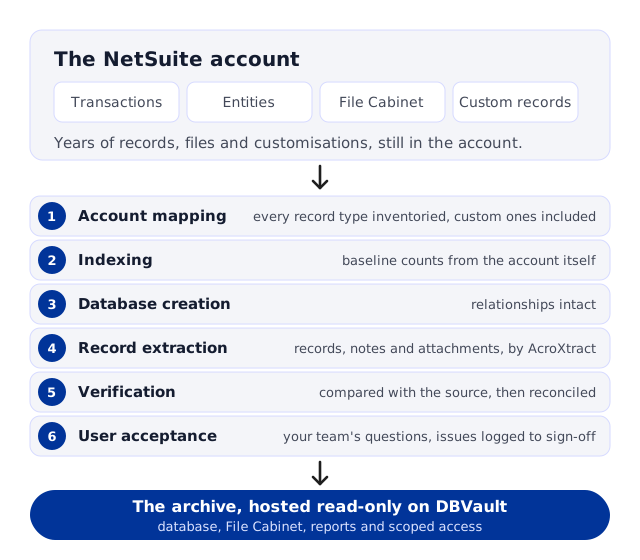
An extraction that will stand up to an audit is a project with a fixed sequence, not a set of saved-search downloads. Ours runs in six steps, and the two that take longest are the two most often skipped.

1 · Account mapping
Every record type in the account is inventoried, including custom records and custom fields. You cannot verify what you did not know to extract.
2 · Indexing
Baseline counts and structures are captured from the account itself, not from the export.
3 · Database creation
A relational database is built to hold the records with their relationships intact.
4 · Record extraction
Transactions, entities, items, accounting records and File Cabinet attachments are extracted into it by AcroXtract.
5 · Verification
Automated database-level comparison of the extracted records against the source account, then financial reconciliation.
6 · User acceptance
Your team works the archive against real questions, with issues logged and resolved before sign-off.
What the archive has to preserve
General ledger detail and the GL impact of each transaction, by subsidiary and by period.
Multi-Book accounting, reconciled book by book.
Custom records and custom fields alongside the standard record types.
Entity relationships: transactions resolve to their customers, vendors, items and subsidiaries.
File Cabinet attachments, linked to the records they belong to.
If people are still working in NetSuite

Most companies keep transacting in NetSuite until the go-live of the new system. A full extraction taken weeks earlier is then incomplete by definition. A delta extraction identifies what changed after the full pass and brings it across before the true cut-off, followed by a mandatory re-verification of the combined set. It is the step most often left out of a decommissioning plan, and the one that decides whether the archive matches the account on its last day. How the first pass, the cut-off and the delta fit together is set out on the extract-while-live page.
How you know the extraction is complete
A matching row count proves that rows arrived. It does not prove that the values are right, that the relationships survived, or that inactive records and custom fields were included. Verification therefore runs in layers.
Automated comparison
Extracted records are compared against the source account at the database level, not by a spot count, in every AcroXtract engagement.
Financial reconciliation
Trial balance and general ledger by subsidiary and period, and each accounting book where Multi-Book is in use.
Relationships and attachments
Transactions still resolve to their entities and line items, and File Cabinet documents to their records.
User acceptance
A formal validation period in which your finance team tests the archive against the questions it will actually be asked, with ticket-based issue reporting until sign-off. The checks a team can run on its own export are in How to verify a NetSuite export is complete.
Access after the subscription ends
The archive is hosted read-only on DBVault. Records cannot be modified after finalisation, and an auditor, a controller and a former subsidiary's finance lead can each be given exactly the scope they need. The data stays exportable as snapshots and CSV, so the archive is never a dead end when the business changes again.

Search and navigate
Structured filtering across transactions, the general ledger and the File Cabinet, with links preserved from records to their original documents.

Financial reports
Trial balance and income statement run from the archived data, for the periods the account covered.

Scoped access
Single sign-on with multi-factor authentication and role-based permissions; read-only for everyone.
When to start
Plan for a project window measured in months rather than weeks, and expect most of it to be validation, not extraction. Start from the date the account will close, or the renewal you intend not to pay, and work backwards.
Where the deadline is already close, we have delivered complete extractions in days. Where the deadline is a subscription end date, the licence expiry page works backwards from it.
Situations in this family
Decommissioning has more than one starting point, and each one changes the order of the work. Three of them have their own page; the rest are covered above.

The licence expires on a date
The subscription end is fixed and external. Working backwards from it, what changes inside the notice period, and what you are holding on the day after. NetSuite licence expiry.
People keep working until go-live
The first extraction is a snapshot of a day. The agreed cut-off, the delta and the re-verification that make the archive match the account on its last day. Extracting while the account is in use.

The new ERP is live
Which history belongs in the new system and which belongs in the archive, who loads what, and how the old account stays answerable for years. Retiring NetSuite after an ERP migration.
Questions asked before a decommissioning
Can we keep using NetSuite until the new system goes live?
.webp)
Yes, and most companies do. The full extraction is taken early, and a delta extraction brings across everything that changed up to the true cut-off, followed by a re-verification of the combined set. The archive then matches the account on its last day rather than on the day the project started.
What if we only keep a read-only NetSuite account for the history?
It works until someone needs the history outside NetSuite: a buyer of a business unit, a subsidiary that is now a separate company, an auditor who wants a dataset rather than a login, or a finance team that has moved to another system. A hosted archive keeps the data yours and exportable; an account keeps it inside NetSuite for as long as you keep paying. How the two costs are shaped is set out on the caretaker licence cost page.
Do you load the data into our new ERP?
No. We extract, verify and archive; the load into a destination system is done by the team implementing it. We supply the data in CSV or MySQL form and work alongside that team where a migration is running. What belongs in the new system and what belongs in the archive is set out on the after an ERP migration page.
How do we know nothing was missed?
Verification compares the extracted records against the source account at the database level, reconciles the financials by subsidiary, period and accounting book, and checks that relationships and attachments survived. Your team then has a formal validation period to test the archive against real questions before sign-off, with every issue logged and resolved.
Who can use the archive afterwards, and how?
Anyone you authorise, through single sign-on with multi-factor authentication and role-based permissions. Finance can filter and navigate transactions, the general ledger and the File Cabinet and run financial reports such as the trial balance and income statement; auditors can be given read-only scope for the records their engagement covers, and filter them by period. What an auditor asks for years later, and how the archive answers it, is on the audit and records retention page.
Is the archive a dead end for the data?
No. Records stay exportable as snapshots and CSV, and we assist customers whose archived data later has to move again, for example when a corporate structure changes. What we do not offer is a productised load back into NetSuite.
How long does a decommissioning project take?
Plan in months, not weeks, and expect validation to take longer than extraction. The elapsed time depends on account size, customisation and how much of your team's time is available for user acceptance. Where a deadline is fixed and close, complete extractions have been delivered in days.
What do you need from us to start?
Access to the account, a contact who knows its customisations, and the date it will close. The sizing form on the AcroXtract page collects database size, File Cabinet size and user count, which is what a quote is based on.
Have the history in use before the licence ends


.svg)


.png)
.png)