.svg)
Full NetSuite Data Extraction: Download the Whole Account as a Database You Keep
Most companies that contact us want one thing first: everything in the NetSuite account, extracted in full and downloaded, before access ends. What counts is what a full extraction contains, how you receive it, how you know it is complete, and what you can do with a database you hold rather than a folder of exports. Hosting on DBVault is the option on top of it, not the price of admission.
Trusted by
.png)






.png)





.png)



.png)














Everything in the account, as a database the organisation holds
AcroXtract extracts the account in full into a relational database, compares the result with the source, and hands the data over to the organisation.
Hosting on DBVault is an option on top of it, not the price of admission. The database is the organisation's to keep. More on how AcroXtract runs the export of all NetSuite data.
What happens next: a reply by email to arrange the walkthrough. No specification, sizing or commitment is needed to ask.
See a completed NetSuite extraction
A walkthrough of a completed extraction on a demonstration archive: the database, the File Cabinet download and the financial reports DBVault runs from it. No account sizing needed first.
Three ways to take the data out, and what each leaves you with
A NetSuite account can be exported by hand, extracted into files, or extracted into a database. They are not the same thing, and the difference shows the first time someone asks a question the export cannot answer.


Saved searches and CSV exports by hand
They work until the volume grows or the account is customised. In our experience, saved-search exports on large accounts often hit limits and flatten sublists, and custom records are missed. The result is a folder, and nobody can join a folder.
A one-off extraction into files
Every record type as its own file, with the identifiers that link records kept in the files. Useful when a successor system or a warehouse will do the loading. The relationships are there to be rebuilt, not enforced. When that is the right shape, the CSV collection page says how.
A full extraction into a relational database
Every record type, its sublists and custom fields, the GL impact of each transaction and the File Cabinet, in a MySQL database that keeps the relationships between records. This is what AcroXtract delivers, and what this page is about.
What a full extraction contains
Full means the account, not the tables that were easy to reach. The scope is written down before the work starts, and the result is compared with the source when it ends.

1 · Transactions with their lines
Invoices with their items, vendor bills with their expenses and linked purchase orders, payments with the invoices they were applied to, journal entries line by line. Sublists survive as sublists.
2 · The GL impact of every transaction
The accounts, subsidiaries, periods and accounting books each transaction posted to, so a trial balance for any closed period can be produced from the database rather than rebuilt in a spreadsheet.
3 · Entities and reference data
Customers, vendors, employees and subsidiaries; the chart of accounts, items, departments, classes and locations.
4 · Custom records and custom fields
As named record types of their own, including sets a SuiteApp created, which is where manual exports most often fall short.
5 · The File Cabinet
Every file with its folder structure and the link to the record it was attached to, so the signed contract opens from the transaction it supports. AcroFile is the service that covers it.
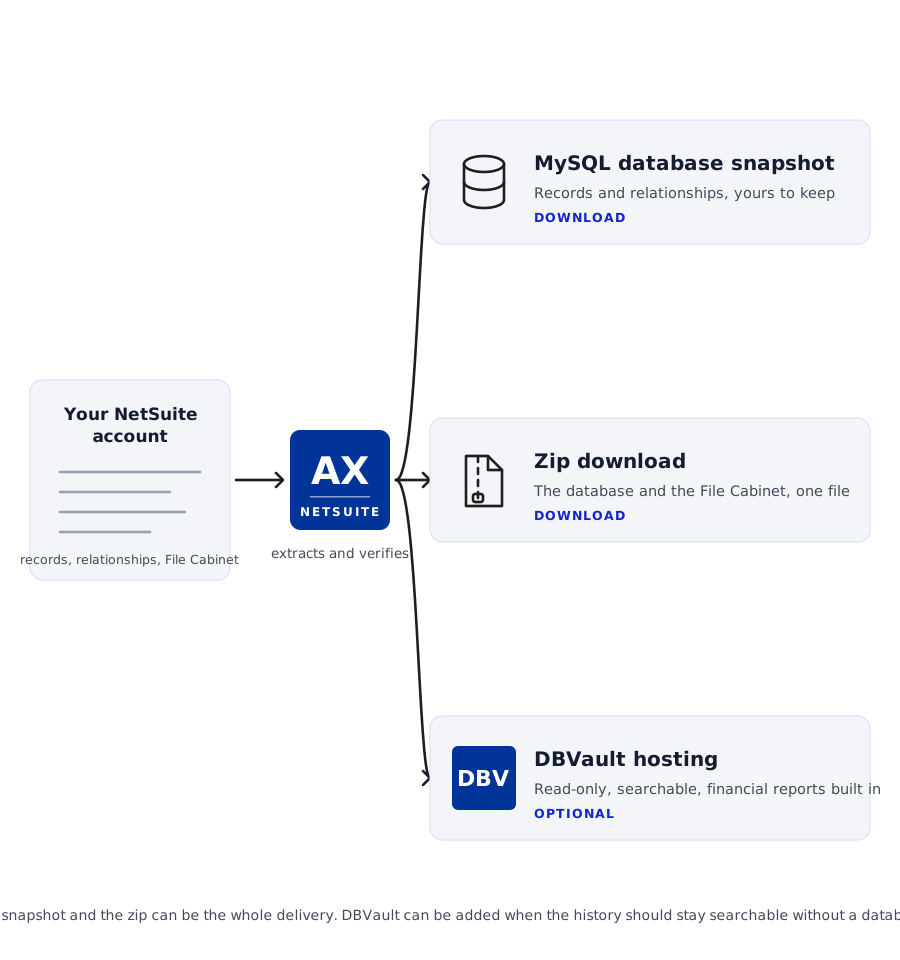
How you receive it
A MySQL database snapshot, loadable on your own infrastructure or in the cloud.
A zip download holding the database and the File Cabinet files together.
CSV files where that is the agreed format.
Verification results: counts and relationships compared against the source.
Optional hosting on DBVault, read-only and searchable, with financial statements.
How you know the download is complete
A download that looks complete and one that is complete differ in the questions you can answer a year later. Completeness is checked in layers, and the last layer is yours.

Compared against the source, type by type
Record counts per type are checked against the account at the database level, not by a spot count. Where a count differs, the cause is looked for before anything is treated as missing: filters, inactive records, permissions, or records that changed during the run.
Relationships and attachments, tested
A transaction still resolves to its entity, its lines and its posting, and File Cabinet files open from the records they were attached to.
Your own validation period
Your team works the database against the questions it will be asked. Each issue is raised as a ticket and cleared before sign-off, and a delta extraction captures what changed if people kept working in the account.
Checks for an export you already hold
If you already have an export, the checks that catch a gap are in How to verify a NetSuite export is complete.
What you can do with a database you hold
The reason to extract into a database rather than a folder is what happens afterwards.

Answer questions with SQL
The relationships are kept, so a query joins invoices to customers to payments the way the account did. A warehouse or a BI tool connects to it directly.

Keep it on your own terms
Load it on your infrastructure or a cloud instance you control and keep it for as long as your retention policy says. Holding it needs no subscription.

Add hosting only if you need it
The same database becomes a DBVault archive when finance and auditors need to search it without a database specialist, with the financial statements built in. The download stays yours either way.
When files are the better shape
When a successor system or a warehouse will import files, or an auditor has asked for files, the same verified extraction is delivered as a CSV collection instead of, or as well as, the database. The CSV collection page sets out what changes.
When to start, and what shapes the cost
Start from the date access ends. Verification needs the account open, so the extraction, the comparison and your validation all sit inside that window, and a delta picks up what changed if work continued after the first pass.
The extraction is sized on what the AcroXtract sizing form collects: database size, File Cabinet size and user count. A quote follows from it. Hosting on DBVault is a separate subscription, and only if you choose it.
To start we need access to the account under credentials you control, a contact who knows its customisations, the date access ends, and where the download is going.
Questions asked about a full extraction
Can we just get the data and nothing else?
.webp)
Yes. The extraction and the download are the service. Hosting on DBVault is a separate, optional subscription, and many engagements end with the snapshot and the zip handed over.
What format is the database?
MySQL. The snapshot loads on your own infrastructure or on a cloud instance you control, and can be queried with standard tools. CSV files are available where that is the agreed format.
Is the File Cabinet included?
Yes. The files come with their folder structure and the link to the record each was attached to, delivered in the zip with the database. AcroFile is the service that covers it.
How do we know nothing is missing?
Record counts per type are compared against the account at the database level, relationships and attachments are tested, and your own team then works the database during a validation period with each issue ticketed and cleared before sign-off.
Can you load it into our new ERP?
No. There is no API for onward migration; the database and the CSV files are the hand-off, and we work alongside the team performing the load.
What if people keep working in NetSuite during the extraction?
A delta extraction captures what changed since the first pass, and is verified the same way, so the download reflects the account as it stood when access ended.
Do we need DBVault?
Only if people who are not database specialists need to search the history or run statements from it. The download is complete without it, and the same extraction can be hosted later if that need appears.
Download the whole account as a database the organisation keeps


.svg)



.png)
.png)