.svg)
NetSuite Data to CSV: Every Record Type as a File Collection You Can Load Anywhere
Sometimes the right shape for the history is files: a successor system that imports CSV, a warehouse that loads them, an auditor who asked for them. A full extraction can be delivered as a CSV collection; what matters is what survives the flattening and what does not, how the files are verified, and when a database is the better choice.
Trusted by
.png)






.png)





.png)



.png)














Export every NetSuite record, not one file at a time
AcroXtract exports every record type in the account in one engagement, verifies the files against the source and delivers them as a CSV collection with the identifiers that link the records, plus the File Cabinet as files.
The same extraction can be delivered as a database instead, or as both. Whatever is delivered is the organisation's to keep. More on the full NetSuite data export.
What happens next: a reply by email to arrange the walkthrough. No specification, sizing or commitment is needed to ask.
See a complete NetSuite export
A walkthrough of a completed extraction on a demonstration archive: every record type as CSV files and as a database, plus the File Cabinet. No account sizing needed first.
A CSV collection is an extraction, not a saved search
The CSV files NetSuite produces by hand and the CSV collection an extraction produces look alike on disk and behave differently the moment a question crosses two files.


Saved-search CSV, one search at a time
In our experience, saved-search exports on large accounts often hit limits and flatten sublists; custom records are easy to overlook, and there is no way to show the set is complete.
Extraction to CSV
The account is extracted in full into a relational database first and verified against the source. The files are then exported table by table: one file per record type, sublists as their own files, and the identifiers that link records kept on every row. AcroXtract runs the extraction.
The File Cabinet as files
Delivered with its folder structure and an attachment index that says which record each document was attached to, so a document can still be traced to the transaction it supports.
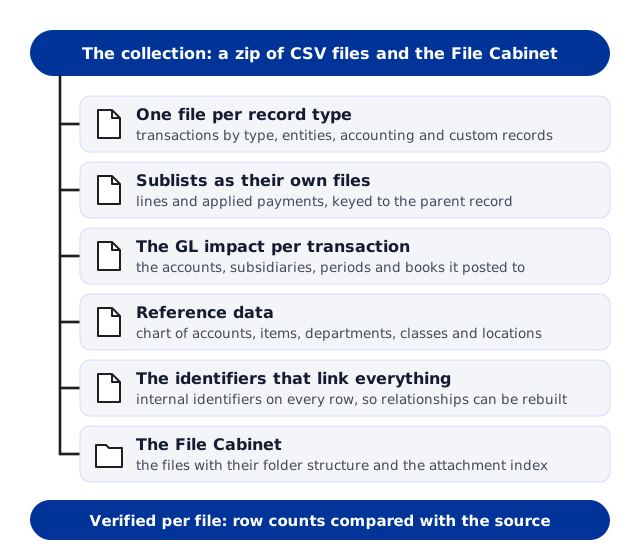
What is in the collection
The same scope as a full extraction, written down before the work starts, and delivered as files rather than as a database.

1 · One file per record type
Transactions by type, entities, accounting records and custom records, each as its own file with the fields the record carried, custom fields included.
2 · Sublists as their own files
Invoice lines, expense lines, applied payments and the other sublists, each keyed to the parent record so nothing is flattened away.
3 · The GL impact per transaction
The accounts, subsidiaries, periods and accounting books each transaction posted to, as a file of its own.
4 · Reference data
The chart of accounts, items, departments, classes and locations, so codes in the transaction files resolve to names.
5 · The identifiers that link everything
Internal identifiers on every row, so a warehouse or a successor system can rebuild the relationships the account enforced.
6 · The File Cabinet
The files with their folder structure and the attachment index.
Delivered as
A zip of the CSV files and the File Cabinet.
The MySQL database snapshot as well, where you want both.
Verification results per file: row counts compared with the source.
Optional hosting on DBVault for the same extraction.
What CSV cannot do
Files do not enforce relationships and do not produce statements. A trial balance for a closed year needs the records joined and summed, which is a database's job. If that is a question you will be asked, keep the database snapshot as well, or host the archive on DBVault, where the statements are built in.
How the files are verified
A folder of files cannot show its own completeness, so the checking happens before the export and after it.
Relationships checked before the export
The database the files come from is compared with the account at the database level: record counts per type, and a transaction resolving to its entity, its lines and its posting.
Row counts per file after it
Each file's row count is compared with the record count in the source, so a file that lost rows in the export shows up before it is loaded anywhere.
Your own validation period
Load a few files where they are going and ask the questions you expect to ask. Each issue is raised as a ticket and cleared before sign-off.
Checks for a CSV export you already hold
If you already have files, the checks that catch a gap are in How to verify a NetSuite export is complete.
Where a CSV collection goes
Files are the right shape when something else will do the loading and the reporting.

Into a successor system
The team doing the load imports the files; the identifiers on every row and the field names in each header are what they map from. We supply the collection and answer questions about it. We do not perform the load.

Into a warehouse or a BI tool
Load the files, rebuild the relationships from the identifiers, and report on the history alongside everything else the warehouse holds.

To an auditor or an adviser
Files an outside reviewer can open with the tools they already have, with the attachment index saying which document supports which transaction.
When to choose files, when to choose the database
Choose the CSV collection when something else will do the loading and the reporting: a successor ERP, a warehouse, an auditor's tools. Choose the database when the history itself has to answer questions, and DBVault when people who are not database specialists have to ask them.
Both come from the same verified extraction, so asking for both is a scoping choice rather than a second project. Say where the files are going and who will load them, and the shape follows.
Questions asked about a CSV export
Can we get CSV only, without the database?
.webp)
Yes. The database is where the extraction is verified; you receive the files. Keep the snapshot as well if a statement or a joined question may come up later.
Do the files keep the relationships between records?
The identifiers that link records are on every row, so the relationships can be rebuilt wherever the files are loaded. They are enforced only once the files are in a database.
Are sublists and custom records included?
Yes. Sublists are delivered as their own files keyed to their parent records, and custom records as files of their own, custom fields included.
Is the File Cabinet included?
Yes, as files with their folder structure, with an attachment index that says which record each document was attached to.
Can you load the files into our new system?
No. There is no API for onward migration; the files are the hand-off, and we work alongside the team performing the load.
Can we move to DBVault later?
Yes. The same extraction can be hosted on DBVault when people need to search the history or run statements without a database, and the files stay yours.
Get every NetSuite record out, verified and yours to keep


.svg)


.png)
.png)