.svg)
Retiring NetSuite After an ERP Migration: What the New System Should Not Absorb
The new ERP is live, or about to be, and the plan says NetSuite is switched off afterwards. The question that decides the next ten years is not how to get data into the new system; the implementation team is doing that. It is what happens to the years of history the new system was never meant to carry: the closed periods, the old customers, the transactions behind balances that were brought across as opening figures. The questions to settle are which history belongs where, who does what, and how the old account stays answerable after it is gone.
Trusted by
.png)






.png)





.png)



.png)














Keep the history out of the new system, and answerable
AcroXtract extracts every record type in the agreed scope from the old account alongside the migration, with the relationships intact and the File Cabinet as files, and verifies the result against the source.
After switch-off, the archive answers the questions the new system cannot: hosted read-only on DBVault, or delivered as a database the organisation keeps.
What happens next: a reply by email to arrange the walkthrough. No specification, sizing or commitment is needed to ask.
See a completed NetSuite extraction
A walkthrough of a completed extraction on a demonstration archive: the database, the File Cabinet download and the financial reports DBVault runs from it. No account sizing needed first.
Two jobs that look like one
A migration moves the data the business needs to operate from tomorrow. Retention keeps the data the business has to be able to produce about yesterday. Treating them as one job produces either a new system stuffed with history it cannot use, or a retired system whose history is lost. Three things separate them.


What the new system needs
Open items, master data, current balances, whatever the implementation team has decided to load and transform into the target's shape. That is their scope, and it is deliberately narrow: every legacy record loaded is a record to clean, map and reconcile in a system with different rules.
What the new system should not absorb
Years of closed transactions with their lines and posting detail, custom records built for how the old business worked, and the File Cabinet with its attachments linked to the records they support. Loaded into the new ERP they are expensive and wrong-shaped; left in a switched-off NetSuite they are unreachable.
Where that history goes instead
Into a relational archive extracted from the account with its relationships intact, verified against the source, and hosted read-only where finance and auditors can search and report from it. That is AcroXtract and DBVault, and it runs alongside the migration rather than inside it.
Who does what, and in what order
The retirement and the migration share a calendar and a source system, and the work divides cleanly when the responsibilities are written down early.

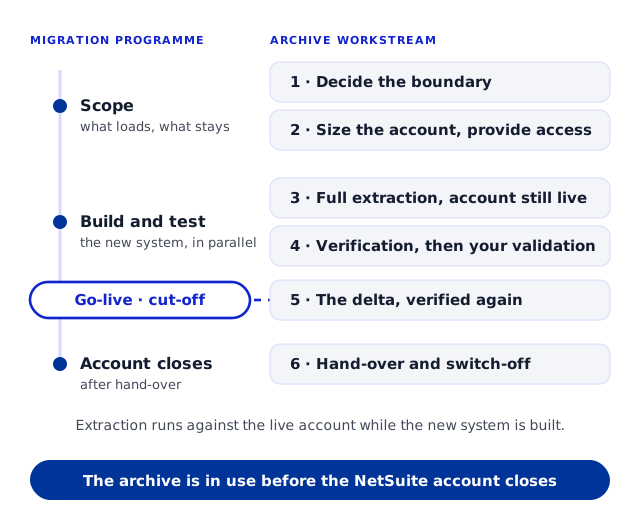
1 · Decide the boundary
Finance and the implementation team agree which data the new system loads and which stays as history. Opening balances and open items go across; the transactions behind them stay in the archive. Write it down; it is the scope of both projects.
2 · Size the account and provide access
Database size, File Cabinet size, subsidiaries, books and the number of people who will need the archive. A dedicated login for the extraction, used read-only, separate from whatever access the implementation team has.
3 · Full extraction while the business keeps working
Account mapping, indexing, database creation and record extraction run against the live account. The new system's build carries on in parallel; nothing here depends on it.
4 · Verification and your validation period
Database-level comparison against the source, financial reconciliation by subsidiary, period and book, then your team tests the archive against the questions it will be asked once NetSuite is gone, with issues tracked as tickets until sign-off.
5 · Go-live, cut-off and the delta
The new system goes live; NetSuite entry stops at an agreed cut-off; a delta brings across what changed since the first pass and the combined set is verified again. The extract-while-live page covers this step in full.
6 · Hand-over and switch-off
The archive is in use on DBVault, the database snapshot and File Cabinet are delivered to you, and where the implementation team needs source data in CSV or MySQL form for its own load, it is supplied. Then the NetSuite account can close.
What the archive holds that the new system does not
Closed-period transactions with every line
The GL impact of each transaction, by subsidiary and book
Custom records and custom fields as first-class record types
The File Cabinet, linked to the records each file supports
The entity relationships: who, what, where, for every transaction
If the target is another NetSuite account
The same division applies when the new system is a fresh NetSuite environment after a change of ownership, structure or implementation. The old environment is treated as a distinct archive with its own identity; loading selected data into the new account is a separate migration activity, scoped on its own, and the archive does not merge into it. When the new environment is an acquirer's, the acquired account's archive is described on the acquired company's NetSuite history.
What we do alongside the migration, and what we do not
Being clear about the boundary is what lets the two projects run side by side without anyone assuming the other has covered something.

We extract, verify, archive and deliver
The whole account, or the scope you agree, into a relational archive; verification against the source; a hosted read-only archive on DBVault; and the data itself as a database snapshot and the File Cabinet, exportable as CSV or MySQL.
We supply the implementation team
Where the team loading the new ERP needs source data in a structured form, it is supplied in CSV or MySQL, with the schema context to read it. We work alongside that team where a migration is running.
We do not load, map or cleanse for the target
Transformation into the new system's schema, cleansing, field mapping and cut-over management are the implementation team's project or a separately scoped one. The archive preserves what the records meant in NetSuite; it is not a target-ready migration package, and there is no direct API into another system.
The old account, answerable for years
After switch-off, the archive is what answers the questions the new system cannot.

The transaction behind the balance
An opening balance in the new system traces back to the invoices, payments and journals that produced it, with their lines, in the archive. See access to NetSuite history after the subscription ends.

Statements for the old periods
Trial balance, balance sheet, income statement and general ledger run from the archived GL impact for every period NetSuite covered, so a comparative or an audit of a closed year does not need the old system.

Scoped access for whoever asks
Finance, an auditor, or a former subsidiary's team are each given the archive, record types and subsidiaries their question covers, with logins and downloads logged, and nothing else.
When to bring the archive into the migration plan
When the migration is scoped, not when the go-live is booked. The boundary decision in step one is the one that most often gets made late, and making it late means either loading history the new system did not want or discovering after go-live that nobody planned for the old periods.
Put the retirement on the migration programme's plan as its own workstream with its own owner, and start it early enough that verification and your validation period fall before the cut-off, not after.
Questions asked when retiring NetSuite after a migration
Should we just load all the history into the new ERP?
.webp)
Usually not. Every legacy record loaded has to be mapped, cleansed and reconciled in a system with different rules, and closed-period transactions, custom records and attachments rarely fit. Load what the new system needs to operate; keep the rest in an archive that holds it as it was.
Do you load the data into our new ERP?
No. We extract, verify and archive the NetSuite account, and we supply the implementation team with source data in CSV or MySQL form where they need it. Transformation, mapping and loading into the target are their project or a separately scoped one.
Are you an ERP migration consultancy?
Not by default. We specialise in extracting, preserving, validating, hosting and making historical data accessible. Where the migration needs the source in a structured form, we work alongside the team doing it.
Can we keep using NetSuite until the new system goes live?
Yes, and most companies do. The full extraction runs early, a delta after the agreed cut-off brings across what changed, and the combined set is re-verified. The extract-while-live page covers the cut-off and the delta in detail.
What if the new system is another NetSuite account?
The old environment becomes a distinct archive with its own identity. Loading selected data into the new account is a separate migration activity scoped on its own; the archive is not merged into the new environment.
Can auditors still see the old years after switch-off?
Yes. The archive holds the transactions, their GL impact, the attachments and the relationships, and financial statements run from it for every period NetSuite covered. An auditor is given a scoped, read-only view of the archive, subsidiaries and record types their engagement covers.
Can the archived data move again later?
Yes. It is delivered as a database snapshot and the File Cabinet, and it exports as CSV or MySQL, so it can follow a later restructuring or a further change of platform. What we do not offer is a productised load back into NetSuite.
What do you need from us to start?
The go-live date, the boundary decision (what the new system loads), access to the account, and a contact who knows its customisations. The sizing form on the AcroXtract page collects database size, File Cabinet size and user count, which is what a quote is based on.
Have the history in use before NetSuite closes


.svg)


.png)
.png)