.svg)
NetSuite Licence Expiry: Getting the Records Out Before Access Ends
The subscription ends on a date that someone else set, and everything the company will ever need from the account has to be out, verified and in use before it. This page is for the finance or IT lead who has that date in front of them: what has to happen in which order, what changes when the date is already close, and what you are left holding afterwards. It draws on engagements where the term end was the deadline, from a five-week estimate delivered early to a complete extraction in days.
Trusted by
.png)






.png)





.png)



.png)














Everything out and verified before the term ends
AcroXtract extracts every record type in the agreed scope, with the relationships intact and the File Cabinet as files, and finishes verification while the account is still open.
The archive is hosted read-only on DBVault and the data is delivered to the organisation as well, so the day after expiry is not a cliff.
What happens next: a reply by email to arrange the walkthrough. No specification, sizing or commitment is needed to ask.
See a completed NetSuite extraction
A walkthrough of a completed extraction on a demonstration archive: the database, the File Cabinet download and the financial reports DBVault runs from it. No account sizing needed first.
The date is fixed; the work is not
A licence expiry is the one decommissioning trigger with no room in it. A migration go-live can slip; a renewal date does not. Most companies that contact us in this situation do so weeks or months before the term ends, and the ones who find it hardest are the ones who assumed an export was an afternoon's work. Three things are true on the last day, and the plan is built around them.


Access ends; the obligations do not
Auditors come back for closed periods, tax authorities ask about old filings, former customers dispute old invoices, and retention rules are measured in years. Every one of those requests needs someone who can open the records and produce them. Plan as if nothing in the account is reachable after the date, whatever the renewal terms say; that is between you and Oracle, and the archive should not depend on it.
The alternative to extracting is paying
The default way to keep the history is to keep a reduced, read-only account renewing for data nobody enters. It needs no project, and it has no end date. What that buys and keeps costing, against an archive sized once on what you have, is set out on the caretaker licence cost page.
The extraction is a sequence, not a download
Getting an account out completely, with its relationships, its posting detail, its custom records and its attachments, and proving that it is complete, is a project with a fixed order of work. AcroXtract runs it; DBVault is where the result lives.
Working backwards from the date
Everything on this list happens before the account closes, and the two that take longest, verification and your own validation, are the two that get squeezed when a plan starts late.

1 · Size the account
Database size, File Cabinet size, the number of subsidiaries and accounting books, and how many people will need the archive afterwards. A quote for the extraction and for hosting follows from those inputs; no date is promised before the account has been sized and access is working.
2 · Provide access
A dedicated NetSuite login for the extraction, used read-only for discovery, extraction and verification, and disabled by you once the work is signed off. Coordinate the timing so it is not removed before the final pass.
3 · Map and index
Every record type in the account is inventoried, including custom records and custom fields, and baseline counts and structures are captured from the account itself. You cannot verify what you did not know to extract.
4 · Extract
Transactions, entities, items, accounting records and File Cabinet attachments come out into a relational database that keeps their relationships intact.
5 · Verify, then validate
Extracted records are compared against the source account at the database level, and the financials are reconciled by subsidiary, period and book. Then your team works the archive against real questions in a validation period, raising anything that looks wrong as a tracked ticket, before sign-off.
6 · Agree the cut-off and take the delta
If people keep working in NetSuite until the end, the first pass is a snapshot of a day. Agree a final data-entry cut-off, take a delta of what changed after it, and re-verify the combined set so the archive matches the account on its last day. The extract-while-live page covers this step in full.
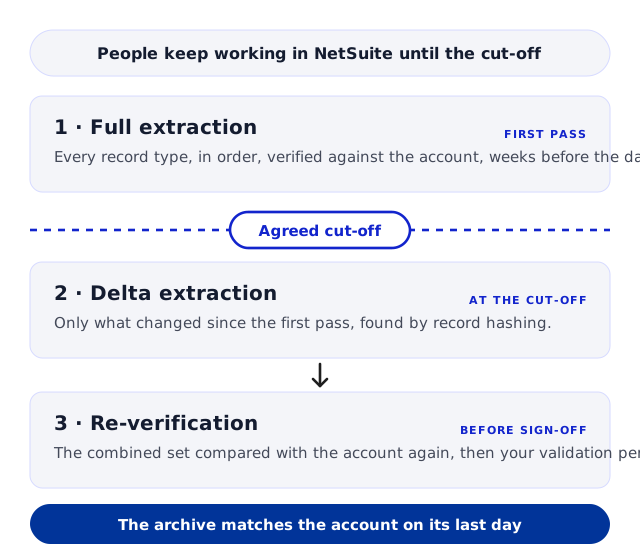
What must be true before the last day
Every record type inventoried, custom records included
Baseline counts taken from the account, not the export
Financials reconciled by subsidiary, period and book
Attachments reachable from the records they belong to
Your team's validation questions answered and closed
The delta taken after the final cut-off and re-verified
If the date is already close
Say so at the first conversation. The order of work does not change, but the scheduling does: sizing and access come first and fastest, the extraction is scheduled around the date, and the validation period is planned so it does not fall after access ends. Complete extractions have been delivered in days where the deadline demanded it. What is never promised is a completion date before the account has been sized and access is working.
How you know it is complete before you lose the source
The one thing a licence expiry removes is the chance to go back and check. Verification therefore has to finish while the account is still open, and it runs in layers, because a matching row count proves only that rows arrived.

Automated comparison against the source
Extracted records are compared with the source account at the database level, not by a spot count, in every engagement.
Financial reconciliation
Trial balance and general ledger by subsidiary and period, and each accounting book where Multi-Book is in use, agree between the account and the archive.
Your validation period, with tickets
Your finance team tests the archive against the questions it will actually be asked, and each issue is raised and tracked as a ticket against the archive under test until it is closed. The checks a team can run on its own export are in How to verify a NetSuite export is complete.
What you are holding on the day after
The archive is hosted read-only on DBVault, and the data is delivered to you as well, so the day after expiry is not a cliff.

Records you can search
Transactions, entities, items, accounting records, custom records and the File Cabinet, with the links between them preserved, filtered and navigated without a NetSuite licence. See access to NetSuite history after the subscription ends.

Statements you can still run
Because the archive holds the GL impact of every transaction, trial balance, balance sheet, income statement and general ledger run from the archived data for the periods the account covered.

Data you own
Deliverables include database snapshots and the File Cabinet data, and the archive exports as CSV or MySQL, so the records can leave again when the business changes: a sale, a restructuring, another platform.
When to start
At the renewal notice, not in the last month. Leaving it to the final weeks before the licence expires creates avoidable risk: access issues, verification, your own validation and a final delta all need time inside the term, and none of them can run after it.
Start from the date the account closes and work backwards through the six steps above; if you are already inside the notice period, the first conversation is about the order of work, and the extraction is scheduled around the date.
Questions asked when the licence is about to expire
Can we keep using NetSuite until the last day?
.webp)
Yes, and most companies do. The first extraction is taken early and is a snapshot of the day it ran. Agree a final data-entry cut-off before the term ends, take a delta of what changed after it, and re-verify the combined set. The archive then matches the account on its last day rather than on the day the project started.
We are already inside the notice period. Is it too late?
Not if access still works. Say so at the first conversation: sizing and access come first, the extraction is scheduled around the date, and the validation period is planned so it does not fall after access ends. Complete extractions have been delivered in days where the deadline required it. What we will not do is promise a completion date before the account is sized and access is confirmed.
What access do you need, and for how long?
A dedicated NetSuite login for the extraction, used read-only for discovery, extraction and verification. You disable it once extraction, verification, any agreed delta and the validation issues are complete; coordinate the timing so it is not removed before the final pass.
Do we need to extend the licence to get the data out?
Whether to extend, and on what terms, is between you and Oracle; we make no claim about what a reduced or extended account includes. What the extraction needs is working access until the final pass is verified. If the date cannot be met with the access you have, that is the conversation to have early, not in the last week.
What happens to our data in NetSuite after the account closes?
We make no claim about what is retained on Oracle's side after expiry, and the plan should not depend on it. Treat the last day of the term as the last day the records are reachable, and have the archive verified and in use before it.
Can you get the data out after the account has closed?
No. The extraction runs with your authorised access while the account is open. Once access has ended there is nothing for it to read.
What do we receive at the end?
A read-only archive hosted on DBVault where finance and auditors search, report and are given scoped access, and the data itself: database snapshots and the File Cabinet, with CSV or MySQL export, so the records are yours to move again later.
What do you need from us to start?
The date the account closes, access to the account, and a contact who knows its customisations. The sizing form on the AcroXtract page collects database size, File Cabinet size and user count, which is what the quote is based on.
Have the archive verified and in use before the term ends


.svg)



.png)
.png)